Unit 1. Configuring Source Data Connection
The first step of synchronizing data to EnOS Hive is to register the external data sources in EnOS by configuring a data connection.
In this unit, configure the connection to the MySQL server that hosts the employee data to be synchronized to EnOS Hive.
In the EnOS Management Console, click Data Connection from the left navigation panel.
On the Data Connection page, click the Add Data Source button.
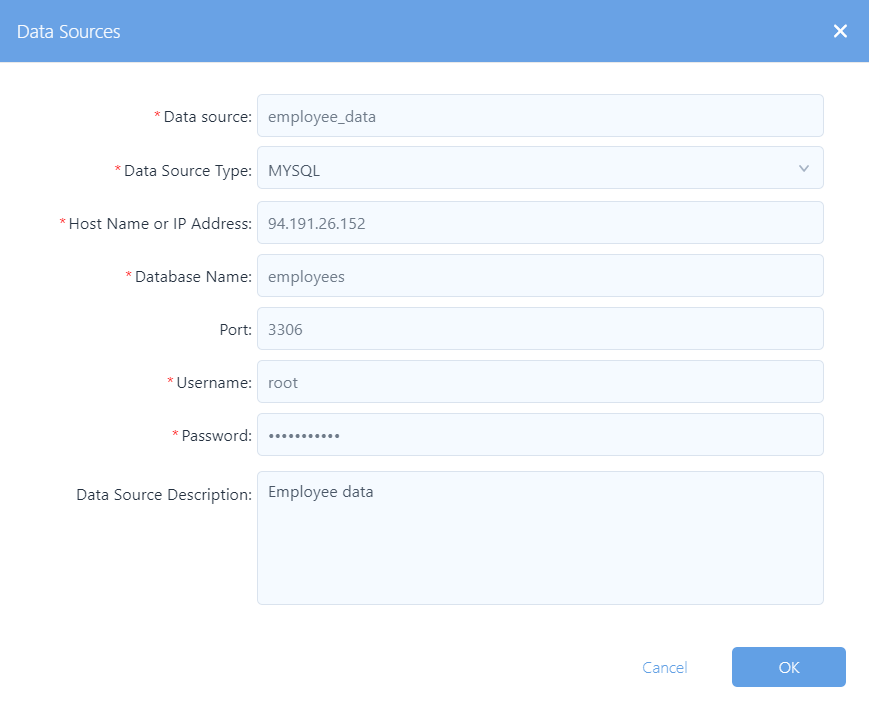
In the Data Sources window, provide the following information:
Data Source: Name of the data source.
Data Source Type: Select MYSQL from the drop-down list.
Host Name or IP Address: Host name or IP address of the MySQL server.
Database Name: Enter a unique name for the database to be connected.
Port: Port of the MySQL server.
Username: User name for accessing the database.
Password: Password of the user name.
Data Source Description: Short description of the data connection.
Click OK to save the configuration. See the following data connection sample:
After the data connection is created, the data connection item is shown in the Data Connection table.